Recap Kits · Prinecton Reverb Reissue Recap
Fender Princeton Reverb Reissue Re-Cap Kit
Thanks for purchasing the Princeton Reverb Reissue Re-Cap Kit.
Optional Tools/Supplies:
- Silicon Glue.
- 9/16” nut driver or socket wrench.
- 1/2” nut driver or socket wrench.
- Fine point Sharpie or similar permanent marker.
- Masking Tape
Skills required:
- Basic soldering skills .
- Basic knowledge of electronics.
Parts
- 22u/35v El Cap × 6
- 22u/500v El Cap × 4
- 5W Resistor (For Safely Draining the filter caps)
Tools
- Temperature Controlled Soldering Iron and Solder
- Solder Sucker and or de-soldering braid
- Multi-Meter Capable of reading 500V DC
- Phillips Screwdriver
- Pliers with insulated handle
- Wire Cutters
- Safety Goggles
- Alligator Leads
1
Step 1
- WARNING: Performing these modifications WILL void the warranty on your amplifier. Working on amps can be deadly if you do not take proper precautions. Follow these instructions very carefully. If you are at all unsure of your ability to perform these modifications STOP and take your amp to a professional to be modified. You can also send your amp to me for modification.
- No Warranty: This kit and the instructions included do not include any warranty of any kind. The modifications to your amplifier are at your own risk and you agree to completely hold harmless the seller of this kit against any and all claims. Tube amplifiers contain parts that operate at very high temperatures and deadly voltages. If you are not sure of your abilities to perform these modifications then do not perform them.
2
Prep the Amp
- Instructions: Follow these instructions to the letter.
- It’s a good idea to have all the parts and tools you will need laid out before starting in a well lit area.
- Unplug the Amp and put on your safety goggles.
3
Step 3
- Remove the tubes, unplug the speaker, unplug the reverb from the chassis (be sure to note which side is red and which side is white, remove the clips holding the power cable to the cabinet.
4
Step 4
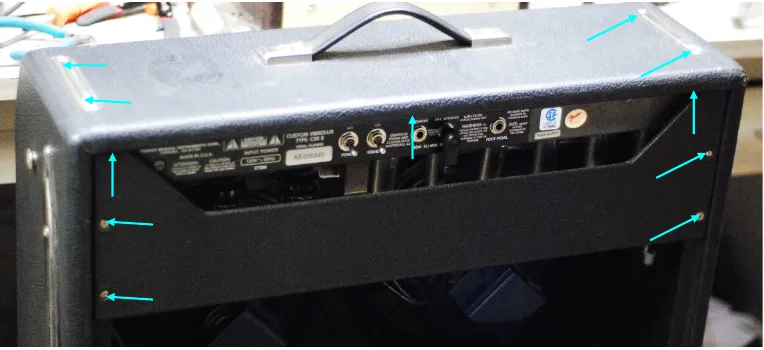
- Remove the screws holding on the back panel and remove the panel. Then remove the chassis screws.
- The chassis should slide out easily exposing the circuit board I find it easiest to work on the amp with the chassis completely removed from the
5
Step 5
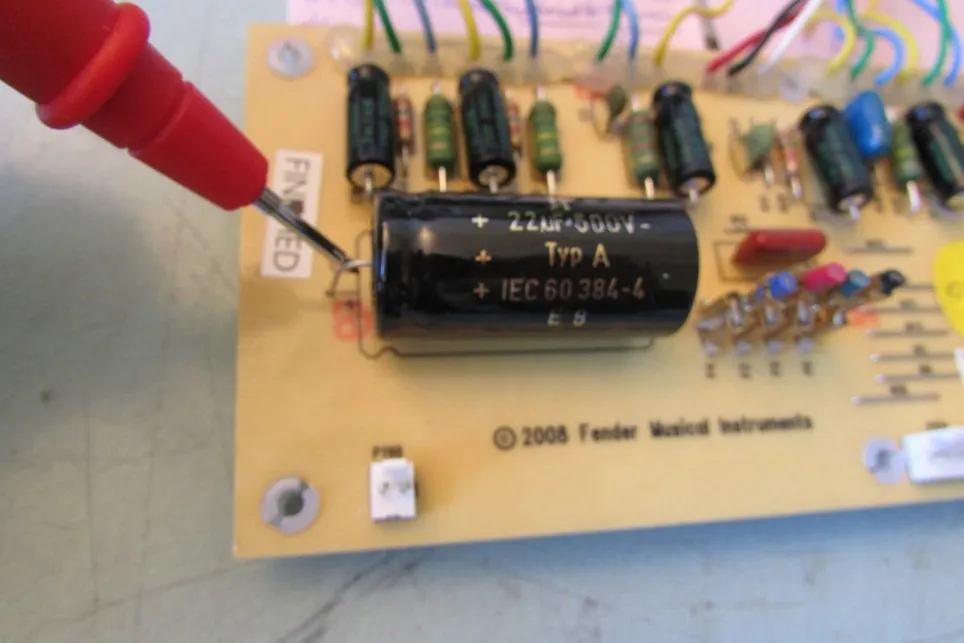
- WARNING: SKIPPING THIS NEXT STEP COULD RESULT IN DEATH
- Drain the Filter Caps: Using your multimeter set to DC and measure the voltage at the positive side of C29 to ground. If the voltage is more than 15 VDC you need to drain the caps. It’s good practice to keep your left hand in your pocket and work only using your right hand. Then if you do touch something that is high voltage while grounded the current will hopefully go though your right hand to ground and miss your heart.
6
Step 6
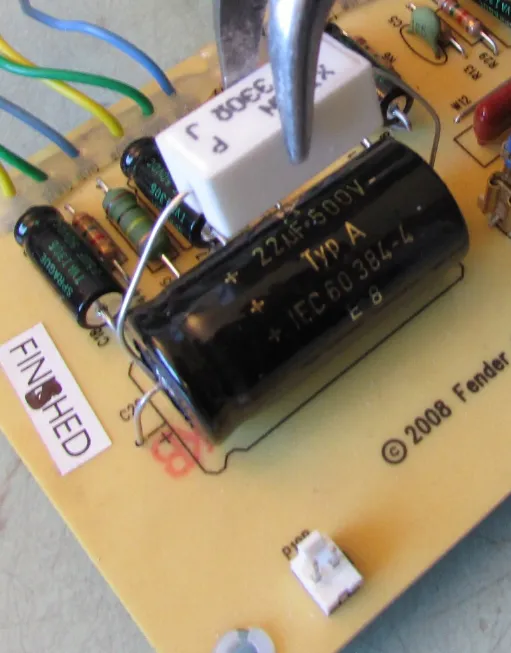
- Using the insulated pliers to hold the power resistor touch one lead of the resistor to the negative side of the 22uf filter cap at C29 and the other to the positive side, leave the leads in contact with the power resistor for 30 seconds and measure again. Keep repeating this step until the voltage reads below 10V.
- Once the filter caps have been drained it is now safe to work on the amplifier.
7
Step 7
- Remove the control knobs by loosening the set screws and all the nuts securing the pots and jacks to the chassis.
8
Step 8
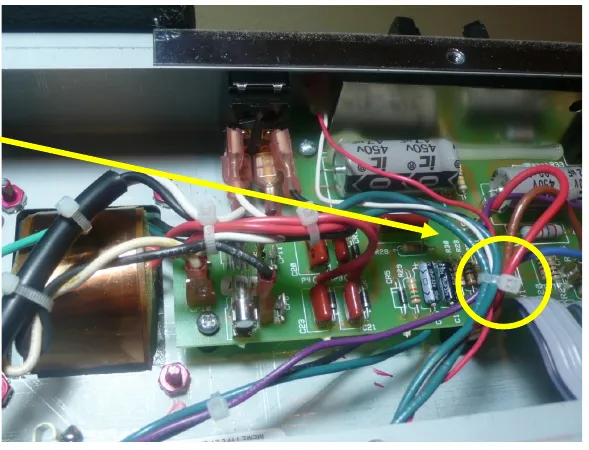
- Clip all of the wire ties.
9
Step 9
- Unplug all the power and output transformer leads by pulling firmly with steady pressure gently rocking the lead terminal from side to side. As you remove each lead mark the wire with masking tape and a Sharpie so you will know where to plug it back in when you are putting the amp back together. I just mark the terminal number on the lead.
10
Expose the circuit board
- Pull gently on the main board to make sure that it is not stuck to any of the standoffs that were holding the circuit board screws.
11
Step 11
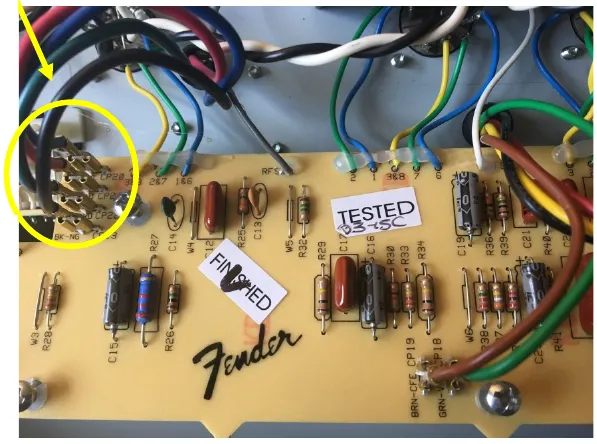
- Undo the ribbon cables from the main board to the control panel board at main board terminals to release it from the control panel PCB.
12
Step 12
- With all the main board screws removed, pull the main board up and back carefully, being mindful of the wires running from the board to the tubes sockets. You’ll need to have it up and bending backwards, putting as little stress on the tube socket wiring as possible.
13
Step 13
- The nuts should have already been removed from the pots control panel. The control panel should freely pull away from the front of the chassis and out.
- DO NOT PUT PRESSURE ON ANY COMPONENTS INCLUDING THE FILTER CAPS WHEN MOVING THE BOARD.
14
Removing the Old Components
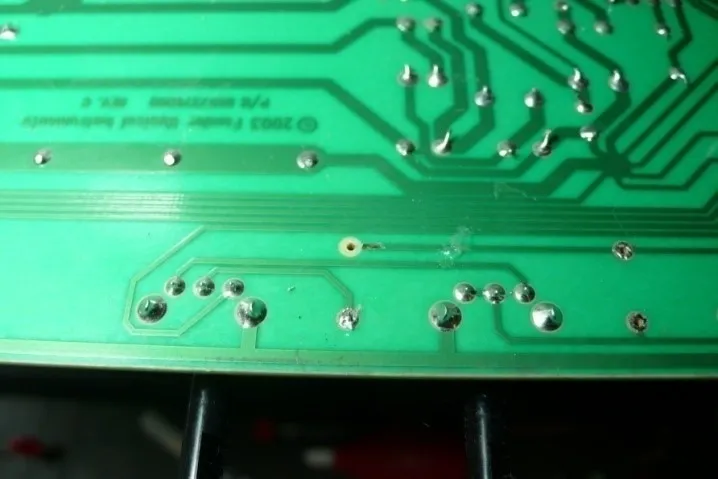
- Be careful that your soldering iron is not too hot. The solder pads on the PCB are prone to curling and separating from the PCB, so remove the components with care, never using force. It is best to clip the component leads on the front of the PCB then remove the remainder of the lead and solder from the back side carefully with a
15
Step 15
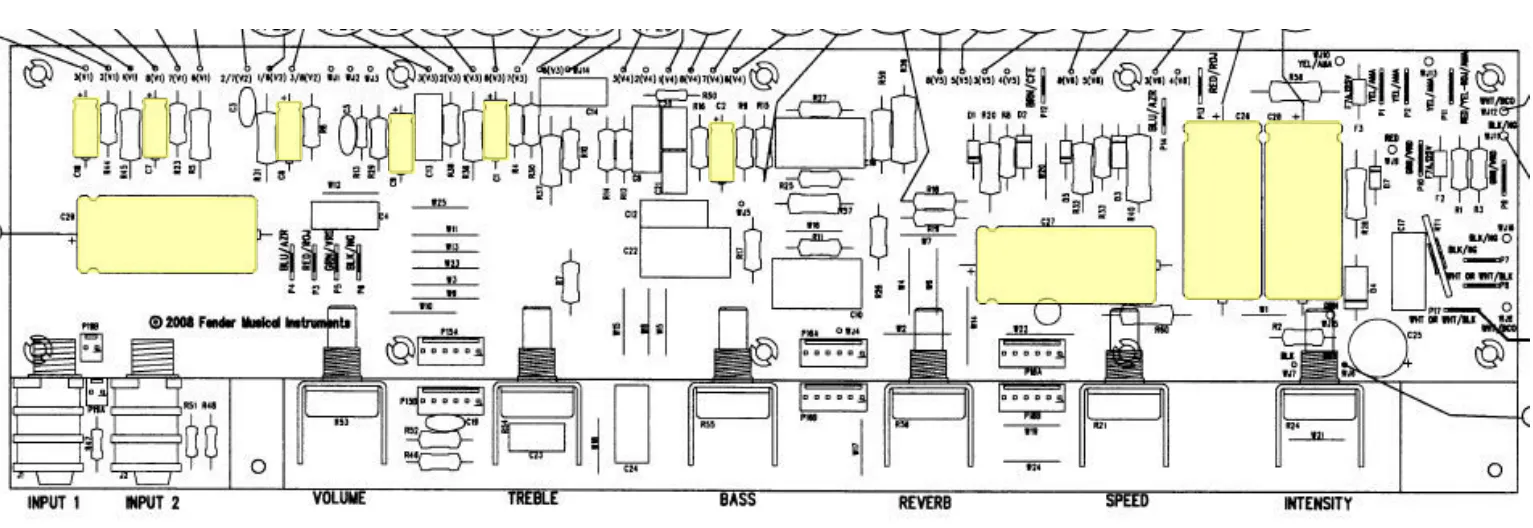
- Type Position Value
- EL Cap C29 22uf/500v
- EL Cap C27 22uf/500v
- EL Cap C26 22uf/500v
- EL Cap C28 22uf/500v
- Type Position Value
- EL Cap C18 22/35
- EL Cap C7 22/35
- EL Cap C8 22/35
- EL Cap C9 22/35
- EL Cap C1 22/35
- EL Cap C2 22/35
- Above is the chart for all the caps and where they go with position numbers. Below is the board layout. Make sure you mind the polarity of the caps, they must be inserted the right way or your amp will have problems which could be serious.
- The circuit board will have a “+” sign closest to the hole where the positive lead of the cap goes. The axial caps have an indented ring on the positive side and a “-” sign in an arrow pointing to the negative side. For radial caps the longer lead is the positive side and there is a “-” sign in a band closest to the negative terminal.
- CAUTION: The circuit board is very fragile and the solder pads can easily become separated from the circuit board if extreme care is not used. Carefully examine each solder pad after removing the component to make sure the solder pad is intact. If the solder pad is damaged you will need to carefully scrape away the solder mask of the trace next to the hole, bend the lead to the trace and solder directly to the trace. Remember to always check continuity with your multimeter to insure that you have a good connection between components.
16
Putting the amp Back Together
- Carefully put the control panel PCB back into the front of the chassis and fasten the nuts back onto the pots to secure the control panel PCB back into the chassis.
17
Step 17
- Carefully put the main PCB back into place and screw it back into the chassis. Hook the ribbon cables from the control panel PCB back into the terminals on the main PCB.
18
Step 18
- Re-install all the transformer leads making sure that all the leads are put back in exactly the same place you took them from, which should not be a problem because you clearly marked where they all went with masking tape and a Sharpie.
19
Step 19
- Make sure all the ribbon cables have a smooth path with no kinks or sharp turns in the cable.
20
Step 20
- Dress the Transformer leads!!! The poor lead dress is a large part of the noise in this amp. Instead of using a new cable tie to put the wires back like we found them we are going to use standard wiring techniques for proper tube amp design.
21
Step 21
- Twist the green heater wires that run to the power tu and position as shown. All other leads should cross each other at 90 degree angles to avoid noise, hum, and oscillation.
22
Step 22
- Slide the chassis back into the cabinet from the back of the cabinet and secure the chassis back in with the top screws.
23
Step 23
- Plug the speaker back into the speaker jack.
24
Step 24
- Re-install the control knobs.
Finishing up
Enjoy your new amp!